Tutorials
Lower thirds from a template
Fill in a lower-third template's name, role and color for each instance, and render one for each row of a spreadsheet.
This page is also a lesson inside Phoenix: choose and start Lower thirds from a template, and Phoenix points at each control as you go. It takes about 7 minutes.
To follow along here instead, download the starting document, lower-thirds.fla, and open it with .
Lower Third is a template: a symbol whose named parts each instance can fill in. Its dynamic text fields name and role are text fields, and its movie clip bar is a color field.
1. Select the lower third
Press V for the Selection tool and click the lower third on the stage.
2. Fill it in
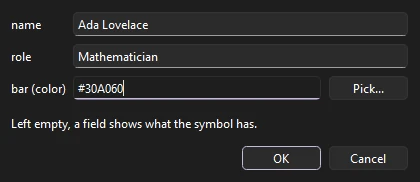
Choose Modify > Symbol > Template Fields... (also on the right-click menu). Type a name and a role, set bar to #30A060, and click OK.
3. Another one
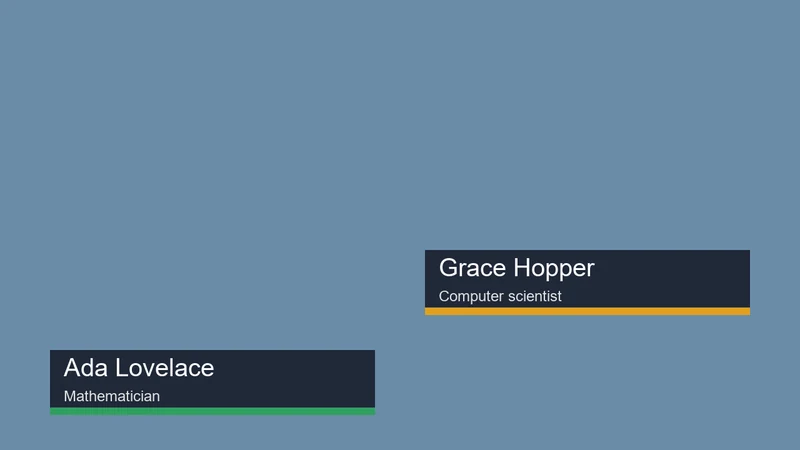
Press Ctrl+D to duplicate the instance, drag the copy up the stage, and give it other words and another color. The symbol is the same; each instance keeps its own.
4. Edit the design once
Double-click either instance to edit the symbol in place and change its design: move the bar, change the font. Both lower thirds change, each keeping its own words. Go back to the scene when done.
5. Render from data
For many at once, save a spreadsheet as CSV: the first row names the fields (file,name,role,bar), and each row after it is one lower third. File > Export > Render from Data... renders the movie once a row.
What you did
You filled in a template two ways and saw how one design serves them all. Add behaviors or letter animators to the template, and every version animates the same way. From the command line, Phoenix render --data renders a spreadsheet without opening a window.
For everything this tutorial touches on, see Symbols and instances.