Tutorials
A bouncy antenna
Give an antenna on a moving head a springy sway with the Jiggle behavior, working through layer parenting.
This page is also a lesson inside Phoenix: choose and start A bouncy antenna, and Phoenix points at each control as you go. It takes about 5 minutes.
To follow along here instead, download the starting document, bouncy-antenna.fla, and open it with .
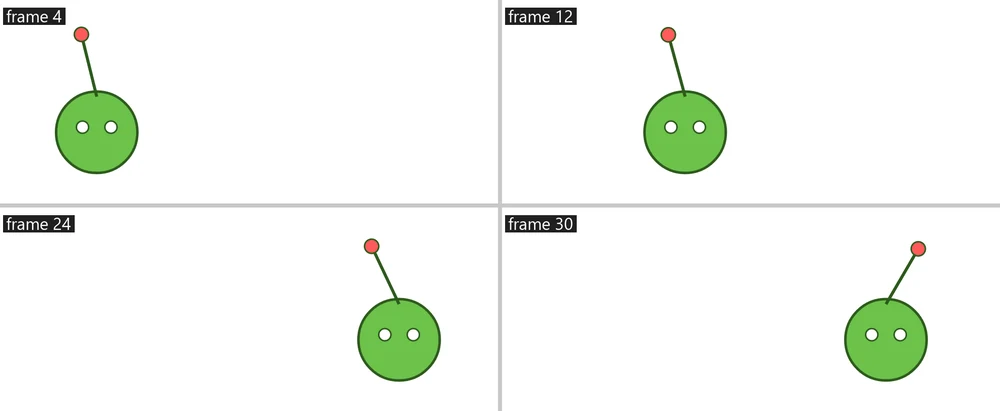
Secondary motion, the follow-through of loose parts, makes animation feel alive. The Jiggle behavior adds it for you: the part sways and bounces on a spring as whatever carries it moves.
Here the Antenna layer is parented to the Head, which runs across the stage and back.
1. Play it
Press Enter, or click the play button in the timeline header. The antenna stays stiff as a pole.
2. Select the antenna
Press Enter again to stop. Press Shift+, (Control > Rewind) to go back to frame 1, then press V and click the antenna.
3. Open the Behaviors panel
Choose Window > Behaviors if it is not showing. It lists what is on the selection and the settings of each.
4. Add Jiggle
Click Add Behavior and choose Jiggle.
5. Play it
Press Enter, or click the play button in the timeline header. As the head starts, the antenna lags behind; as it stops, the antenna swings on past and settles.
6. Make it springier
Press Enter again to stop. Set Bounce to 85 for a wobblier antenna, or Springiness to 1 for a slow, heavy sway. Play again to see.
What you did
You added follow-through with one behavior. It points says which way the part sticks out from its pivot: Down for a hanging sign or earrings. Jiggle follows its own keys as well as the layers it is parented to.
As with any behavior, Bake turns it into keyframes.
For everything this tutorial touches on, see Behaviors.